





)
)
)
)
)
)
)
)
)
)


Microware Hub Adapter for Desktop, Keyboard
- 12 Months cover from date of purchase for New Smart Phones
- Repair of device for Accidental and/or Liquid damage.
- Max 2 repair requests, cumulatively capped upto the device invoice value.
- Like to Like replacement
- Free Pick-up & Drop
- 14 Working Days TAT
Ever accidentally spilt coffee, tea or water on your phone? Did your phone ever get drenched in the rain? All of these can damage parts within your phone and make it unusable or non-responsive just when you most need it. Smartphones are fragile and prone to physical damage. So we recommend you buy this accidental damage and liquid protection cover. Fixing a liquid damaged Smartphone is expensive and time consuming if it isn't covered under the manufacturer warranty or extended warranty. Buying this Extended Warranty for your smartphone will protect your phone for 12 months.
| Validity | 1 Year |
|---|---|
| Brand | Reliance Retails |
| Warranty | 1 Year on handset. 6 months on accessories |
Items are eligible for return within 7 Days of Delivery*. All accessories, product & packaging need to beEver accidentally spilt coffee, tea or water on your phone? Did your phone ever get drenched in the rain? All of these can damage parts within your phone and make it unusable or non-responsive just when you most need it. Smartphones are fragile and prone to physical damage. So we recommend you buy this accidental damage and liquid protection cover. Fixing a liquid damaged Smartphone is expensive and time consuming if it isn't covered under the manufacturer warranty or extended warranty. Buying this Extended Warranty for your smartphone will protect your phone for 12 months.
Samsung 138 cm smart television with Pureview QLED
1 Year resQ Care Plan. Accidental and liquid damage Protection for LCD
Amount Payable:
- Switching: A. Button on the device. B. Keyboard hot key( Ctrl+F11). C. Mouse kick the globe icon. Setup guide:You can refer to the user manual.Use a low-resistance USB cable before switching manually, you should install software then use keyboard and mouse to do it. The device will not automatically switch printing tasks from one computer to another, you should manually use keyboard and mouse. Keyboard control can use combing keys or mouse control after installing software.
- USB sharing Hub provides easy one-touch switching of a USB device or hub between two computers. Important note: For better data transfer, pls keep the the USB Cables(connected to the input and output devices) Length less than 3M.
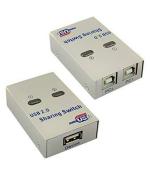
- USB 2.0 Sharing Switch is a great solution for sharing USB devices like USB printer, scanner, curve plotter, multifunction printer, Bluetooth equipment with two computers
- Printer Sharing Switch LED indicator lights show which connected computer has control of the attached devices. Important Note: Please make sure the input voltage is Standard 5V. Any charger with higher voltage output is NOT allowed and may affect the product performance.
- Support up to 2 pcs input, and 1 USB device output. Device with USB port, like printer, scanner, curve plotter, multifunction printer, Bluetooth equipment, can be connected to this USB sharing Hub, so 2 computers can sharing a USB device, by this we can save lots of space.
Select your phone brand & model

How do I avail exchange offer?

Answer few simple questions about your old device

Get the exchange value

Keep your device handy when our delivery executive arrives
Key points to keep in mind before exchange:
- The old phone or device should be in working condition (It should be switched ON and all buttons should be in working condition)
- Delete all your personal data by performing ‘Factory Reset’ and remove any memory card from your old phone or device
- Keep your phone/device in unlocked mode while handing over old phone/device to Delivery Partner (Please remove any passwords or screen locks)
- Delivery Partner will check the physical & functional conditions of the old phone/device (Check damage, working of touchscreen and camera condition) and match IMEI number with the information entered by you while buying new phone on JioMart.
Working of exchange operation on JioMart
For Mobiles
- Click on ‘Exchange’ available on ‘Details Page of Product’ you want to buy.
- On JioMart application, you must select the ‘Brand and Model’ of the old phone to be exchanged.
- Now, on JioMart application, you can select the condition of the smartphone (Perfect condition, Minor Body scratches an Both Screen & Body damage)
- Then on the app, you must enter the IMEI number of the smartphone. The same IMEI will be checked at the time of pickup for validation.
- You need to accept the terms and conditions for exchange before proceeding with exchanging your device with JioMart. Please read Exchange T&C present on JioMart application.
- After completing all the steps above, you can see ‘Exchange’ as applied on ‘Product Details’ page and proceed with adding product to cart
- You will be able to track the status of new product and old product to be exchanged on ‘JioMart Order History’ page by clicking on my order tab
- Exchange will be performed while delivering the new smartphone to customer
- Quality check of the old phone to be exchanged will be done at the doorstep by Delivery Partner.
- Delivery Partner will check following parameters while doing quality check –
- IMEI number
- Power switch ON/OFF
- Working of all buttons
- Damage on body of the phone
- Working of touchscreen
- Working and physical condition of camera
- If quality check passes, you will be able to exchange your old phone and accept the delivery of the new smartphone
- If quality check fails, you have the following two options:
- Accept the new phone order – You can accept the new phone by paying an exchange amount (this is the same as Exchange Value which was applied during checkout) to the Delivery Partner either in cash or via any other digital payment mode offered by the Delivery Partner
- Does not accept the new phone order – You have an option to not accept new order by not paying the exchange amount
- Once the exchange is completed, you can see related information on Order Details page
FAQs
Stage 1: While placing an order on JioMart
- How do I find products eligible for exchange?
- You will be able to see 'Exchange Offer Available' within the product section on listing page.
- On ‘Product Details’ page, ‘Exchange’ will be active if PIN Code is serviceable for exchange process and by clicking on the same, you will be able to enter required details
- How to find an IMEI number if I want to exchange my old smartphone?
- To know IMEI number, dial *#06# on your phone (Please enter IMEI 1 in case of dual sim phone.)
- You can also find the IMEI number in the original package, phone settings and inside battery compartment
- Can we get a list of used products that can be exchanged on JioMart?
No, as the list shared by Buyback Partner keeps on changing and is dynamic in nature. You can check the Brand and Model during Step 1 of the exchange process. - Is it possible to exchange more than one used device to buy a new device?
No, you will be able to exchange only one device for the new one. - Can Delivery Address for new smartphone and Pickup Address for old smartphone be different?
No, as this is a hand-on-hand exchange process, the old device will be picked up at the time of delivering the new device at the delivery address. - Do I need to pay pickup charges for exchange?
No, you do not need to pay any pickup charges for exchanging your old device with JioMart.
Stage 2: After placing an order on JioMart
- How do I track the status of my order with Exchange?
You can go to ‘My Order’ tab and check the status of your new product and old product in the same section. - Will my old product be picked up before the new product gets delivered?
No, as this is hand-on-hand exchange operation, old device will be picked up at the time of delivering new device. - Do I need to send old products to JioMart?
No, we will arrange a pickup of your old phone while delivering the new smartphone.
Stage 3: At the time of Delivery and Pick up
- Is it possible to understand what parameters are being checked as part of quality check at doorstep for old phone?
Yes, Delivery Partner will check following parameters while doing quality check:- IMEI number
- Power switch ON/OFF
- Working of all buttons
- Damage on body of the phone
- Working of touchscreen
- Working and physical condition of camera
- If the battery of my phone is dead/damaged or in poor condition, will my smartphone be eligible for exchange?
Though the condition of the smartphone will be checked at the time of quality check at the doorstep, JioMart recommends not to exchange as there are higher chances of quality check failure at the doorstep. - Is it compulsory to provide original accessories and packaging of my used product?
Though it is not mandatory, JioMart recommends that you provide old phone along with original accessories and packaging. - What happens if quality check gets failed at the doorstep?
If quality checks fail at doorstep, you will be provided with two options:- Accept the new phone order – You can accept the new phone by paying an exchange amount (this is the same as Exchange Value which was applied during checkout) to the Delivery Partner either in cash or via any other digital payment mode offered by the Delivery Partner
- Does not accept the new phone order – You have an option to not accept new order by not paying the exchange amount
Stage 4: After new product delivery
- Is it possible to get my old device which is exchanged with new device?
No, it is not possible to get the old exchanged device back after delivery of the new device as it has already been processed by our third-party buyback partners. - Will I be able to check the details of my old product exchanged on JioMart?
Yes, you will be able to see details of your old product exchanged in the Order History and Order Details page. - Am I allowed to return the new product which I ordered with Exchange?
Yes, you will be allowed to return the new product based on the Return Policy mentioned on the Product Details Page. - Am I allowed to replace the new product if I find any damage after accepting the delivery?
No, currently at JioMart we are not allowing replacement options, but you can return the product you ordered. - Where shall I get the refund of old smartphone exchanged if I do return the new product?
Refund of the old smartphone exchange will be credited to either JioMart Wallet or bank account based on your selection. - Shall I be able to track Refund status on JioMart Application?
Yes, once the refund gets processed you will be able to see Refund Details inside the My Refund section and on the Order Details page.